This chapter contains guidelines for the external form, page layout, headings, body text, citation, figures, tables, footnotes and language.
3.1 External form
All written work supervised by me must be submitted online as a PDF file. The guidelines in this manual apply without restriction to term papers, project and internship reports, and Mastery Papers in the vocational education module.
If, in individual cases, final theses are submitted in printed form by agreement, they must be bound and submitted in duplicate. Each copy must be accompanied by a PDF file of the complete paper on a mobile data carrier (USB stick or CD) that is identical to the submitted version.
Please choose adhesive binding with a black cardboard spine and transparent cover. The data carrier must be firmly attached to the printed paper so that it cannot fall out. The USB stick will be returned to you in the colloquium.
3.2 Page layout
Purely digital theses are created in a single-sided layout.
Printed theses are created in a double-sided layout. Here, blank pages occur, for example, as back side of the cover page, or when a chapter begins on an odd-numbered page and the previous even-numbered page is not labelled. These blank pages are also included in the digital version of a printed paper.
The page numbers are located in a separate header at the top right. In printed theses, the page number is located at the top right on odd-numbered pages and at the top left on even-numbered pages.
The page numbers of the lists (see Elements of the paper) are formatted consecutively as lowercase Roman numerals. The numbering begins on the cover page, on which, however, the number “i” is not visible. The page numbers from the first page of the text section to the last page of the paper are consecutive Arabic numerals. A thin black line separates the upper header from the body of the text.
The page margins are approximately 2.5 cm all around. In printed theses, they are set so that after binding, the inner and outer margins are the same size. For this purpose, the binding correction (spine/BCOR) of 8 mm is taken into account. In the digital version of printed theses, the page margin is therefore uneven, larger on the left on odd-numbered pages and larger on the right on even-numbered pages. In works that are not printed but only submitted digitally, the binding correction can be omitted.
A serif font, e.g. Palatino Linotype or Times New Roman, in size 11 pt to 12 pt with 1.15 to 1.3 line spacing should be selected. The font colour is black (exception: coloured labels in illustrations/graphics, if applicable).
The paragraph spacing before and after headings, illustrations, tables, formulas and paragraphs should be set so that the work appears clear and tidy.
3.3 Headings
Headings are left-aligned and set in the same font as the text. They are clearly distinguished from the text by their font size, bold type and vertical spacing.
Headings are numbered using outline numbers. The headings at the highest outline level (chapter headings, “Heading 1”) are each placed at the top of a new page. If the paper is submitted in printed form, this should be an odd-numbered page. (Exception: In Mastery Papers, chapter headings are not placed on a new page.)
Important in Word: Be sure to select the outline with automatic transfer as headings, do not activate normal numbering! Otherwise, the headings will be indented and will not function optimally in conjunction with the tables of contents and lists (e.g. list of figures, list of tables) and the cross-references.
3.4 Text
The body text is left-aligned and justified. Automatic hyphenation should be set so that at least one and no more than two lines in a row end with a hyphen. If necessary, conditional hyphens should be used in words that the word processor would otherwise not hyphenate correctly. The currently valid rules of German spelling must be observed. Spelling, punctuation, grammar and the appropriate use of technical terms turn a good piece of work into a very good one. To check the layout of a piece of work at an early stage, before extensive passages of text have been written, automatically generated dummy text can be very useful. A Lorem Ipsum generator or the Word functions “=rand(x,y) [ENTER]” or “=lorem(x,y) [ENTER]” can be helpful here, where x stands for the number of paragraphs to be inserted and y for the number of sentences per inserted paragraph.
3.5 Citation
Whenever foreign texts, representations or ideas are used directly (“copied 1:1”) or indirectly (copied in essence) in a written work, they must refer to the original information resource (source) and be marked as direct or indirect quotations. The identification must be made directly at the point in the paper where the quotation appears. Failure to do so may constitute plagiarism and the paper will be graded as “unbefriedigend” (5.0, fail).
In the work I supervise, the citation style according to DIN ISO 690:2021 should be used in one of these two variants:
- Educational science papers: name-year system, in accordance with Appendix A of DIN ISO 690:2021
- Technical theses: Numbering system, in accordance with Appendix B of DIN ISO 690:2021
According to the name-year system, at least the author’s surname and the year of publication of the source are given in the text as a short reference, supplemented by the page number on which the quoted passage can be found in the source (Smith 2025, p. 3).
In the numbering system, sources are numbered in the order in which they appear in the text. The short reference consists only of the number in square brackets, supplemented by the page number where the quoted passage can be found in the source [42, p. 7].
The complete source details can be found in the bibliography, which is attached directly to the text of the work.
Further details on citation methods, in particular on the question of which information is required for which source/information resource, can be found in DIN ISO 690:2021. It is worth investing 15 minutes in carefully reading this standard, because correct citation is a key quality feature of academic work.
In common reference management programmes (e.g. Zotero and Citavi), you can easily set the citation style in accordance with DIN ISO 690. This makes correct citation and referencing really very easy. You only need to enter the sources correctly into the database and you can also manage the citations there directly. Zotero is available free of charge at www.zotero.org.
3.6 Figures
A picture is worth a thousand words! And a self-created illustration gives the readers of your written work (especially me as an examiner) important clues about your motivation and your skills:
- You have understood the content of the illustration and grasped it to such an extent that you were able to not only put it into your own words, but also embed it in your own thought structure.
- You know how to use the tools of academic work, in this case a graphics programme or the graphics function of your word processing programme.
- You have made the effort and have not simply copied or scanned something. The reverse conclusion that can be drawn from copied or scanned illustrations is also fatal here.
Unfortunately, illustrations (even good ones) are not self-explanatory to the reader. If they stand alone without further explanation, they can be misunderstood or even overlooked in the flow of reading. This is all the more tragic the more effort you have put into creating them. The content and meaning of the illustration should therefore be explained in the text. This should be done with reference to the illustration, e.g. by saying “see Figure 3” or “Figure 3 illustrates the process …“.
If the illustration is not on the same page as the reference, which is perfectly acceptable and even common practice in professional typesetting to create a good page layout, the reference must also include the page number (“… Figure 3 on p. 14 illustrates …”).
Therefore, each figure has a caption, i.e. a line of text below the corresponding figure containing the word “Figure” or “Fig.” followed by a space, the consecutive number, a colon, a space, a concise short description and, if applicable, the source from which the figure was taken. The source is separated from the description by a line break [ENTER] directly under the short description. This ensures that it does not appear in the List of figures (see Figure 1 as an example).
If the illustration has been taken from an external source, this must be indicated after the short description by providing a short reference to the source as follows:
- If the illustration has been reproduced in whole, it should be treated as a direct (image) quotation, e.g. as follows: (author year, p. 42) or [4, p. 42].
- If the illustration has been reproduced in terms of content and/or graphics and supplemented by your own revisions, this must be indicated by adding “cf.” at the beginning of the short reference, e.g. as follows: (cf. Author Year, p. 42) or [cf. 4, p. 42].
- If data from different sources is included in an illustration, all sources used must be indicated.
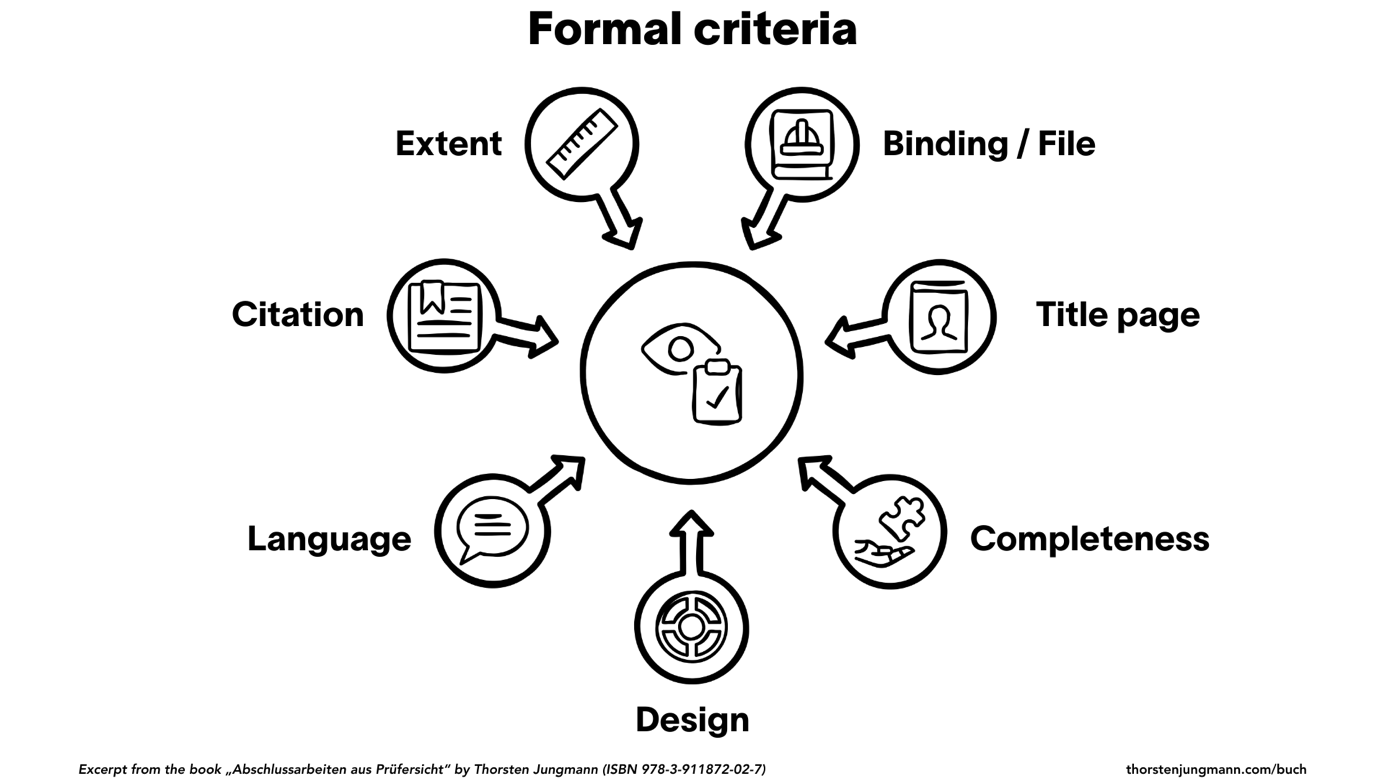
Figure 1: Formal criteria of academic theses (as an example figure)
(Jungmann 2025, p. 38)
For your own illustrations, you could indicate that it is your own creation. However, this is basically superfluous, as everything that does not have a source reference is attributed to you anyway. It becomes interesting when you trace an existing illustration and adapt it for your work. This is then your own illustration based on the original and should be marked as “Figure X: Description (based on <source>)“.
In order to achieve automatic, continuous numbering of figures and automatic generation of cross-references, the corresponding function in Word should be used to insert the captions.
Those who use LaTeX do not need to worry too much about this, as various packages and commands, e.g. vref, automatically ensure correct references. In Word, such cross-references can be generated using the figure number and page number fields.
Please also note the information on the List of figures.
3.7 Tables
In a table, data can be presented and summarised more easily than in a purely verbal description. Nevertheless, tables are not self-explanatory for readers. If they stand alone without further explanation, they can be misunderstood or even overlooked in the flow of reading. This is all the more tragic the more effort you have put into creating them.
The content and meaning of the table should therefore be explained in the text. This is done by referring to the table in a cross-reference, e.g. “see Table 2” or “Table 2 illustrates the relationship between … and …“. If the table is not on the same page as the reference, which is perfectly acceptable and even necessary for large tables in the appendix, the reference should also include the page number (“see Table 2 on p. 14”).
Therefore, each table has a heading, i.e. a line of text above the corresponding table containing the word “Table” or “Tab.” followed by a space, the sequential number, a colon, a space, a concise short description and, if applicable, the source from which the data in the table was taken (see Table 2 as an example).
If the data in the table or the entire table has been taken from an external source, this must be indicated immediately after the short description by providing a short reference to the source as follows:
- If the table has been reproduced faithfully, it should be treated as a direct quotation.
- If data has been partially taken and supplemented with your own headings or columns, this must be indicated by adding “cf.” to the short reference.
- If data from different sources is included in a table, all sources used must be indicated.
Table 2: Weighting of criteria of academic theses (as an example table)
| Criteria | Form | Methods | Contents |
|---|---|---|---|
| Weight | 20% | 30% | 50% |
Those who use LaTeX do not need to worry too much about this, because various packages and commands automatically ensure correct references for tables as well.
In order to achieve automatic, continuous numbering of tables and automatic generation of cross-references, the corresponding function in Word should be used to insert the table headings.
Please also note the information on the List of tables.
3.8 Footnotes
Footnotes should be avoided. Either a piece of information is important/relevant, in which case it belongs in the text, or it is not, in which case it can be omitted. In accordance with the permitted citation methods – the footnote system is not one of them – neither short nor long references should appear in footnotes.
3.9 Gender-sensitive language
The following notes on gender-neutral language reflect my view on writing academic papers. The explanations are detailed in the German version of this document as “Gendern” is often misunderstood in general and especially in German academic texts.
3.9.1 Definition and aim of gender-sensitive language
By gender-neutral language, I mean the use of gender-neutral or gender-inclusive word forms or words, e.g. learners, teachers, etc. The opposite of gender-neutral language is the use of gender-sensitive word forms such as male teacher, female pupil, etc. Both the neutral and the differentiating form have their place in academic theses.
In my opinion, the aim is to reflect the gender composition of a group as accurately as possible in academic texts and, in the interests of comprehensibility, to avoid new word creations that have not (yet) found their way into the Oxford dictionary and long lists by using male and female (or even more) forms.
3.9.2 Gender neutrality yes, but not at any price!
Apart from precision and improved readability, I personally do not pursue any goals with gendering in academic texts and do not expect it in the student papers I supervise. As long as gendering is conducive to the above-mentioned priorities or at least does not harm them, I am fundamentally in favour of it.